• Skip to primary navigation
  • Skip to main content
Earmark CPE

Earmark CPE

Earn CPE Anytime, Anywhere

  • Home
  • App
    • Pricing
    • Web App
    • Download iOS
    • Download Android
    • Release Notes
  • Webinars
  • Podcast
  • Blog
  • FAQ
  • Authors
  • Sponsors
  • About
    • Press
  • Contact
  • Show Search
Hide Search

AI Agents

The Manager Paradox: Why AI Agents Need Just as Much Oversight as Human Employees

Earmark Team · February 9, 2026 ·

David Leary had something to confess at the start of The Accounting Podcast episode 471. He needed an employee health insurance survey for his company, and the whole thing, from blank page to finished Google Form, took him three and a half minutes.

“I started with nothing, and I needed a result, and end to end it did everything for me,” David told co-host Blake Oliver. ChatGPT created the survey questions first. When its implementation got clunky, Google Forms with built-in Gemini AI took over and built the entire form. No tedious field creation or manual option adding. Work that would have taken an hour vanished in the time it takes to brew coffee.

It’s the kind of AI success story that’s becoming common: technology wiping out drudgery and freeing humans for better work. But as the hosts dug deeper in this episode, they uncovered a reality check for accounting firm leaders.

AI’s Hidden Cost: Same Management Time, Different Headaches

The tools keep getting better at connecting dots. Blake pointed to Google’s new “Personal Intelligence” feature that links Gmail, photos, YouTube, and search into Gemini with one click. ChatGPT has similar workspace integrations that search your email history for client and project information.

“Once your firm gets big enough, you don’t realize three other people also have relationships with that client,” David noted. AI that surfaces that context before you act is a real leap forward.

But the success story gets complicated when you deploy AI agents across an organization. Jason Lemkin, who runs SaaStr (a community for software startup founders), has been tracking the results of such deployments. At SaaStr, about 60% of the team is now made up of AI agents. They deliver huge productivity gains, but also need about the same weekly management time as humans.

“The big mistake,” David explained, summarizing Jason’s findings, “is that you can’t treat AI as set-it-and-forget-it. You have to have daily management of AI.”

The reason you need that oversight is the accuracy rates. For five- to ten-minute tasks, AI hits near-perfect accuracy: 99.9%. But stretch those tasks to an hour or two, and accuracy drops to 80% or even 50%. And AI mistakes don’t announce themselves.

“The AI makes these small mistakes that compound into big mistakes,” Blake said. “Humans do this, too. If you don’t have proper oversight of people, they’re just doing their own tasks, and small errors can compound into disasters.”

When There’s No One Watching the Store

The IRS is an excellent case study for what happens without human oversight of AI. The IRS just lost more than 25% of its workforce through various reduction programs, according to the IRS Advisory Council’s annual report. Over 2,000 IT workers have left since January 2025 alone. More than half of the $80 billion allocated under the 2022 Inflation Reduction Act has been rescinded, totaling about $42 billion since 2023, including nearly all enforcement funding.

Now the agency faces implementing the One Big Beautiful Bill Act (OBBBA), which includes more than 100 tax law changes. They need new guidance, technology updates, and process changes—all with fewer people and less money.

The consequences of this skeleton crew approach became clear in the case of Attallah Williams, a former SBA and IRS employee charged with stealing more than $3.5 million from federal COVID-19 relief programs. Williams used insider access at both agencies to approve fraudulent applications, recruiting accomplices through Instagram and collecting kickbacks. The scheme ran for three years and touched Paycheck Protection Program (PPP) loans, Economic Injury Disaster Loan (EIDL) grants, and employee retention credits.

“If one person can approve fraudulent pandemic applications, there are no controls at the federal level,” David said.

Tax Season Reality Check

Against this backdrop, tax season readiness varies wildly. CPA Trendlines’ busy season survey found that only 44% of firms feel about as ready as they were last year. Larger firms with 25 or more professionals report greater stability thanks to deeper staffing and refined processes. Smaller firms with 1-10 employees face the most volatility.

“Late documents, absences, compressed review cycles. When you have fewer people, you have less redundancy,” Blake noted. “When problems happen, it hurts more.”

Tax-heavy firms feel particularly exposed since their entire season depends on client behavior. Firms with recurring revenue from bookkeeping or advisory work report more stability because their work spreads throughout the year.

One bright spot came from Brenda Cannon of Cannon & Associates, who shared an innovation on the CPA Trendlines podcast. Instead of letting tax work pile up, she gives clients calendar links to schedule when they’ll submit documents. Eight slots per day, Monday through Thursday. Fridays for internal work. No slots three weeks before April 15th (reserved for extensions). Clients who don’t schedule by year-end get marked inactive.

“Clients no longer complain about extensions because they basically chose to miss their self-imposed deadline,” Blake explained. Only about 5% of clients left after implementing the system.

The Vanishing Entry Level

But even successful adaptations can’t solve a bigger problem: what happens when AI absorbs all the entry-level work that trains future professionals?

“The quality burden used to fall on the senior staff and managers,” David said. “But now the managers are going to have to bear that weight.”

Blake expanded the concern. Managers used to trust that trained seniors had learned to review work through years of practice. With AI handling those training tasks, that trust disappears. “I have a theory that life is going to get harder for managers in public accounting because they’re going to be the only thing between the AI doing the work and the partner.”

A viewer captured the problem in the live chat: “You can’t get experience to become a manager without an entry level. Bots and offshore have absorbed entry. So how do you get new managers?”

Blake’s answer was sobering. If firms can’t develop managers internally, they’ll have to recruit from industry. But industry professionals who’ve tasted work-life balance won’t return to the grind of public accounting. “The people won’t drink the Kool-Aid after they’ve had a break from drinking the Kool-Aid.”

Testing for Yesterday’s Skills

This transformation raises tough questions about the CPA exam itself. The 2024 pass rates were:

  • Audit and Attestation: 46%
  • Financial Accounting and Reporting: 4%
  • Tax Compliance and Planning: 73%
  • Regulation: 63%
  • Business Analysis and Reporting: 38%
  • Information Systems and Controls:58%

“The hardest part of the exam isn’t the material,” Blake argued. “We’re not doing advanced math. We’re doing algebra. It’s not complicated stuff; it’s just a lot of memorization, and it’s a real grind.”

Blake’s theory is the exam filters for grinders because that’s what firms needed. “The exam is a grind, and public accounting is a grind so they lined up.”

But that’s not the job anymore. “We don’t need accountants to come in and do a bunch of boring, manual, tedious work,” Blake said. AI does that now. The profession needs people who can analyze concepts and direct AI agents, not memorize rules they can look up in seconds.

“You have all these AI tools where they have all the knowledge. You don’t need to memorize things,” David added.

Yet change comes slowly. “Even if the powers that be agree with you, Blake, it’ll be a decade before they change that,” David said.

The Bottom Line

David’s three-minute survey creation shows where we’re headed: routine tasks becoming instant. But efficiency isn’t freedom. AI needs as much management as humans, but a different kind of management. The cognitive burden shifts up while the entry-level work that trained judgment disappears.

Every knowledge profession will face the same questions. How do you develop talent when AI does the training work? How do you maintain quality when the middle layer of reviewers vanishes? How do you test for skills that matter when memorization becomes obsolete?

Listen to the full episode of The Accounting Podcast for all the details, including more on the IRS crisis, innovative tax season solutions, and a surprise supporter for millionaire taxes.
Your QuickBooks Is Smarter Than You Think (And Getting Smarter Every Day)

Earmark Team · January 7, 2026 ·

When you can upload a photo of a bank statement and watch QuickBooks turn it into perfectly categorized transactions, you know something big is happening in the accounting world. The tedious work that once took hours is disappearing, replaced by something far more valuable: actual business insights.

In episode 114 of The Unofficial QuickBooks Accountants Podcast, titled “Those Sneaky AI Agents,” hosts Alicia Katz Pollock and Dan DeLong explore the seven AI agents that Intuit built into QuickBooks Online. After testing these tools extensively, they conclude it’s “90% AI and 10% marketing,” a ratio that should interest any accounting professional wondering if these changes matter.

The Seven AI Agents

Intuit rolled out seven different AI agents across QuickBooks: accounting, payments, customer, finance, project management, analytics, and payroll. As Alicia explains, “All of this is not even version 1.0. It’s kind of version 0.5 at this point.” Some features are in beta, others depend on which QuickBooks version you use, and a few you might not see unless you’re using specific features like projects or payroll.

But these agents are turning QuickBooks from a recording system into something that actually helps you make decisions. “What they’re trying to do,” Alicia notes, “is take the data, make it actionable, and give us insight into what’s happening in the business so we can actually take action on it.”

The Accounting Agent: Your New Data Entry Partner

The accounting agent has completely redesigned how bank feeds work. While teaching a three-hour class on the new features, Alicia made a surprising discovery. “All the things I was taking out were all of the gotchas and the troubleshooting.” Problems that plagued users for years, like dealing with duplicate transfer rules, simply don’t exist anymore.

The new banking interface features inline editable fields, meaning you can categorize transactions without constantly clicking into detailed views. Yes, it looks more cluttered at first, especially on smaller monitors. But there’s a fix: hit Control+Period (or Command+Period on Mac) to activate Zen mode, which folds away the sidebar and gives you full screen for your banking work.

The AI now explains why it’s suggesting certain categorizations. As Alicia describes it, “This is why you are off base, or oh, this is why that actually makes sense.” The downside is you have to retrain the AI from scratch. The good news is it learns fast—usually after seeing each transaction type once for monthly items, or three times for quarterly ones.

The Game-Changing PDF Upload

Here’s where things get really interesting. If your bank doesn’t connect to QuickBooks, you no longer need to wrestle with CSV files. Just drag in a PDF, JPEG, or PNG of your statement—even a photo from your phone works. The AI scrapes the document and creates a functioning bank feed with all the categorization benefits of a direct connection.

There are limits. Statements with both checking and savings accounts on the same page won’t work (though you could split them with a PDF editor). Complex statements get sent to human reviewers who typically respond within two hours, and they use your statement to improve the system for everyone.

Collaboration Without Meetings

The new collaboration feature adds a speech bubble icon to each transaction. Click it to ask questions, request documentation, or explain unusual expenses, all without scheduling a meeting. One of Alicia’s clients who previously met monthly with her bookkeeper immediately saw the value. “She is really excited to not necessarily have to meet in real time.”

The “Ready to Post” feature finds the sweet spot between automation and control. Instead of auto-adding transactions, it identifies high-confidence categorizations and presents them in a bubble at the top of your feed. As Alicia explains, “These are the transactions that we are pretty darn sure we got right.” Review them all and accept them with just two clicks.

Smarter Reconciliation and Problem Detection

The new reconciliation screen looks complex at first, but it’s actually brilliant. Upload your bank statement, and QuickBooks shows you exactly where problems hide. Not just “you’re off by $150,” but whether the difference is in deposits or payments.

Each transaction now has two rows: one showing what the statement says, another showing what QuickBooks says. Colored badges instantly communicate status. Green means matched. Blue means it’s in QuickBooks but not on your statement. Orange flags special situations like voided transactions.

The anomaly detection feature takes this further. Blue sparkles appear on reports when something breaks from normal patterns. Alicia describes her old process: “I’ve always had to run a P&L by month and physically scan all of the numbers and then drill in to go see, well, why is this one higher than usual?” Now the AI simply tells her: “You have this extra transaction for five times as much as usual.”

The Payments and Customer Agents: Growing Your Business

The payments agent analyzes your invoice history to surface potential issues. When Alicia’s system revealed “84% of your invoices last year were paid late, or not at all,” it immediately suggested adding a 2% late fee and provided the setup right there.

For each customer, it tracks payment patterns individually. Do they always pay three days late? Twenty days late? This insight helps you make smart decisions about payment terms and follow-up strategies.

The Customer Hub (currently in beta) adds full CRM capabilities to QuickBooks. It can scan your Gmail or Outlook for business conversations and turn them into leads. Track prospects through your pipeline from inquiry to close. But the real magic happens after the sale.

The system can send automatic feedback surveys after invoice payment. Happy customers (4-5 stars) get asked when they want to work together again and if they know anyone who needs similar services. These responses appear as work requests and warm referrals in your Customer Hub. As Alicia emphasizes: “That’s new business. That is money in your pocket.”

Evolution, Not Replacement

These AI agents aren’t replacing accountants; they’re freeing us from tedious work to focus on what matters. As Dan notes about modern business, “If you’re waiting for a quarterly report to be done three months ago to make a decision these days, that’s just not fast enough.”

The key is Dan’s “trust but verify” approach. The AI excels at pattern recognition but needs human judgment for context. When his payments agent incorrectly suggested late fees for on-time payments, human insight caught what the AI missed.

Alicia’s advice? Start clicking those blue sparkles. Give feedback with the thumbs up and thumbs down buttons. Don’t just dismiss features because they’re in your way; actually evaluate if they’re helpful. As she puts it, “Thumbs down is ‘No, this thing is not accurate and it’s not helpful,’ not ‘I don’t want to look at it right now.'”

Ready to see these “sneaky AI agents” in action? Listen to the full episode where Alicia and Dan demonstrate each feature, share implementation strategies, and explain exactly which upgrades might be worth it for your practice. The future of accounting is here, right in your QuickBooks account.


Alicia Katz Pollock’s Royalwise OWLS (On-Demand Web-based Learning Solutions) is the industry’s premier portal for top-notch QuickBooks Online training with CPE for accounting firms, bookkeepers, and small business owners. Visit Royalwise OWLS, where learning QBO is a HOOT!

QuickBooks Online’s Latest AI Update Could Save You Hours of Detective Work

Earmark Team · September 1, 2025 ·

Picture this: You’re reviewing a client’s profit and loss statement when travel expenses catch your eye. They’ve jumped 624% from last month. Is this legitimate business growth, a categorization error, or duplicate entries? Traditionally, this would mean hours of detective work, drilling into transaction details and cross-referencing receipts.

But what if an AI agent had already investigated this anomaly, traced it back to two identical $10,834 hotel charges, and presented you with a detailed report, complete with visual charts and actionable recommendations?

This feature is rolling out to QuickBooks Online users this summer.

In this episode of The Unofficial QuickBooks Accountants Podcast, Jim Dzundza, Staff Product Manager for the QuickBooks Accounting Automation team, explains how AI-powered error detection agents are transforming accounting workflows. But this isn’t about robots replacing bookkeepers. It’s about intelligent collaboration where AI handles time-consuming pattern recognition while accountants focus on analysis and client relationships.

From Program Manager to Product Developer

Dzundza’s journey at Intuit offers unique insight into how accountant feedback shapes product development. He started on the business development team working on desktop product partnerships, then moved to manage the ProAdvisor program for several years.

“Accountants have had a special spot in my heart,” Dzundza explains. “They are the key to us developing amazing products and amazing functionality.” His transition from the front-facing ProAdvisor program to backend product development wasn’t accidental; it was driven by impact.

“I felt like I could make a bigger impact by bringing this accountant perspective and finding a team within Intuit that really thinks about how accountants use and love the product,” he says. “And then focusing on where a lot of the pain is, to be honest. How can we help accountants reduce the pain of the work that they have to do?”

This accountant-first approach shows in every feature Dzundza shared on the podcast.

The AI Agent Revolution Begins

QuickBooks Online’s new platform introduces six specialized AI agents, each designed for specific accounting functions. The accounting, payments, and finance agents are currently available. Project management is in beta, while payroll and customer agents are coming soon.

The rollout timeline is aggressive but manageable. All new files created now automatically use the new platform. Starting in July, existing users can opt into the new experience. By September, everyone will see it, with the ability to opt out until the transition becomes mandatory at the end of September.

“We are daily reviewing feedback that is streaming in around all of the new UI, the new agents, everything coming out,” Dzundza emphasizes. “We’re implementing fixes and changes based on user feedback.”

This feedback period allows accountants to shape these tools rather than simply accepting what’s provided.

Eliminating Data Entry Frustrations

The accounting agent tackles three major workflow areas: getting transactions into the books, categorizing them, and reconciling accounts. Each advancement addresses real pain points accountants face daily.

PDF Statement Upload

For years, working with small banks meant manually keying transactions or using third-party tools like MoneyThumb. The new PDF statement upload feature completely changes this.

“You have the PDF and you go in to add that statement or upload those transactions in the same way you would upload a CSV today,” Dzundza explains. “And now you’re able to upload a PDF.” The AI extracts transactions directly from bank statement PDFs, eliminating the need for external conversion tools.

Enhanced Collaboration

Perhaps more revolutionary is the new collaboration feature available on Essentials and above. When you encounter a transaction needing clarification, you can ask questions directly within the bank feed and send clients a magic link via email or text.

“They can go on their phone and answer the question,” Dzundza notes. “They can answer it from wherever without having to log into QuickBooks.” Once clients respond, the AI automatically updates its categorization recommendations based on that context, creating a feedback loop that improves accuracy for future similar transactions.

This addresses a major frustration: forcing business owners to log into QuickBooks just to answer simple questions about transactions. It also gives accountants control over their books while still gathering necessary context.

Reconciliation Gets Smarter

The reconciliation process receives similar AI enhancements, with tools launching in mid-July. Like bank feeds, reconciliation now supports PDF extraction with a crucial enhancement: when the AI can’t extract everything accurately, it flags questionable areas for human review.

“Our goal for this one is 100% accuracy,” Dzundza explains. This hybrid approach, combining AI speed with human verification, ensures accuracy while eliminating manual data entry.

The new reconciliation interface organizes information into logical sections: cleared transactions that matched one-to-one, flagged one-to-many matches requiring review, and AI recommendations for transactions that should potentially be excluded or unposted.

This addresses common reconciliation headaches like duplicate detection. As Dzundza discussed with host Alicia Katz Pollock, it’s easy to upload a receipt and then also accept the same transaction from the bank feed without noticing the duplication. The AI now surfaces these duplicates automatically, eliminating manual scanning for errors.

The Anomaly Detection Game-Changer

The most sophisticated feature is the accounting agent’s anomaly detection, which transforms financial statement review from manual line-by-line scanning to intelligent pattern analysis.

How It Works

The system analyzes 13 months of historical data, comparing the most recent complete month against established patterns to identify accounts that deviate significantly from normal behavior. But it’s smarter than simple variance detection. It considers each account’s historical volatility. Accounts with consistent monthly variation won’t trigger alerts for normal fluctuations, while stable accounts get flagged for even modest deviations.

“It looks over the past 13 months, and then it looks at the most recent complete month,” Dzundza explains. “And it will tell you if this month’s total seems off on either the balance sheet or P&L.”

Professional-Quality Investigation

When the system detects anomalies, the AI conducts detailed investigations using what Dzundza describes as “customized prompts we designed in partnership with accountants.” These prompts guide the AI to analyze transaction patterns, identify common characteristics, and surface potential root causes.

Travel expenses are a perfect example of this capability. When the AI flagged a 624% increase in travel expenses, it didn’t just note the variance; it traced the increase to two identical $10,834 hotel charges from the same vendor, immediately raising the question of whether these were duplicates or legitimate separate transactions.

Seamless Integration

The feature integrates directly into standard financial statements through subtle blue sparkles next to affected line items. Clicking a sparkle opens a detailed analysis directly in context, allowing investigation without leaving the familiar report format. The sparkles don’t print when you export reports, maintaining clean client deliverables while providing powerful review capabilities.

Actionable Reporting

The AI generates professional-quality PDF reports that serve as both investigation summaries and work papers. These reports include visual charts showing the anomaly, detailed root cause analysis, supporting data points with reference numbers for easy transaction lookup, and comprehensive narrative explanations of findings.

As Katz Pollock notes, “this is something I would be very happy to just send to my client.”

The Partnership Model That Works

These AI updates aren’t about replacing accountants, but about elevating their work.

“It’s not about replacing jobs or anything like that,” Dzundza emphasizes. “It’s really focused on creating tools that make people more efficient in getting their work done.”

As Katz Pollock summarizes, “this is in no way taking your job. All this is doing is calling your attention to things that it’s noticed in a way that you would not have access to just by looking.” The technology provides pattern recognition and initial investigation, but professional judgment about significance, cause, and appropriate action remains firmly in human hands.

Your Voice in the Development Process

Dzundza stresses that development teams are reviewing user feedback daily and implementing changes based on that input.

This gives accounting professionals a unique opportunity to actively shape these tools. The key is providing constructive, actionable feedback with specific details rather than general complaints.

The Future of Accounting Practice

Technical proficiency with AI tools is becoming as important as traditional accounting skills. Accountants who embrace this partnership will find themselves elevated from data processors to strategic advisors, spending less time hunting for errors and more time interpreting their significance for clients.

The collaboration model redefines what it means to be an accounting professional in an AI-enhanced world. The accountants who thrive will be those who view AI as a powerful research assistant rather than a threat, focusing their expertise on the strategic analysis and client relationships that technology cannot replace.

As these AI agents roll out over the coming months, you have the opportunity to be part of shaping the future of accounting practice. Listen to the full episode to hear Dzundza’s complete demonstration of these features, understand the implementation timeline, and learn how to provide constructive feedback that will help refine these tools for maximum benefit to accounting professionals.

The future of accounting is being written now. Make sure your voice is part of that conversation.


Alicia Katz Pollock’s Royalwise OWLS (On-Demand Web-based Learning Solutions) is the industry’s premier portal for top-notch QuickBooks Online training with CPE for accounting firms, bookkeepers, and small business owners. Visit Royalwise OWLS, where learning QBO is a HOOT!

AI’s ‘Killer Function’: Personal Agents That Work for You

Earmark Team · May 6, 2024 ·

Sam Altman, the creator of ChatGPT, says that helpful agents will be AI’s ‘killer function,’ integrating deeply into our lives and acting as extensions of ourselves.

It sounds like science fiction, but you can start doing this now! In this clip from Episode 383 of The Accounting Podcast, I demonstrate how to create an AI agent using Central, a new feature of Zapier.

AI agents are a massive leap over today’s AI chatbots. Most popular chatbots can’t act autonomously. If you sign up for ChatGPT or Claude, you have to prompt it for everything you’re doing – copy-paste between whatever’s in your life and the bot. It’s a big hassle and wastes a lot of time.

But if you turn a chatbot into an agent, you give it the ability to act independently. Imagine a virtual assistant who can automatically respond to all the daily routine questions you get bombarded with.

For example:

| Hey, can I get an update on my tax return?

| When can I expect my financial statements?

| Please send a copy of your W-9 (or we won’t pay you)

Your AI agent has you covered, firing off personalized responses faster than you can say “accounts receivable.”

Or imagine an AI agent with access to your calendar that responds to meeting requests with the best times for you to meet based on your detailed instructions.

Sure, we have apps like Calendly, but these apps are limited and impersonal. For instance, I like to bunch my meetings, and Calendly doesn’t do that. I could tell my AI agent always to try to fit new meetings before or after an existing meeting. And it could do this by replying on my behalf to emails rather than me sending a link.

This is a big deal. Think about it – how many hours do you spend each week on repetitive tasks or answering questions? Now, you can start to automate them.

Zapier has built a tool, Zapier Central, where you can create your own AI agents triggered by the thousands of apps that already connect to Zapier.

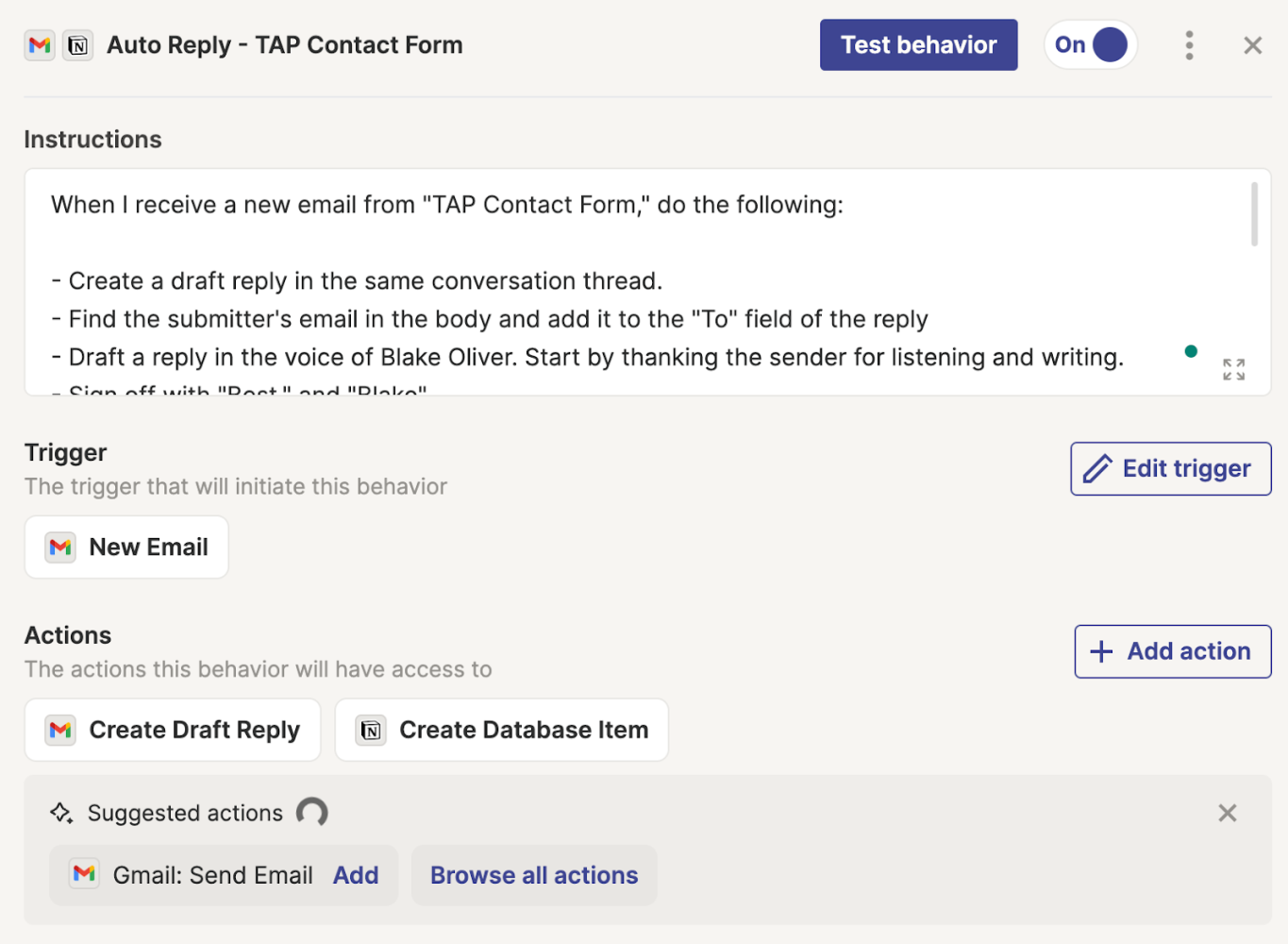
I’ve been experimenting with having Central draft emails for me. I built an agent called “Email Assistant” and gave it access to my Gmail account. Then, I created a “behavior” with instructions to monitor my inbox for emails from our podcast contact form.

We get daily emails from listeners of The Accounting Podcast, and I read and respond to every single one. There are a few things that are annoying about the process.

  • The email comes from a different email address than the listener’s, so I have to copy/paste the listener’s email into the “To” field.
  • I have to add my co-host to the CC field so he’s in the loop.
  • I have to draft the email, which typically includes similar phrases. For instance, I start by thanking the sender for listening and writing in.
  • I tend to sign off in the same way every time, but I still need to type it because I don’t always use the signoff, and I don’t want it in my email signature

To get the Email Assistant to do all this for me, I gave it the following instructions:

When I receive a new email from TAP Contact Form, do the following:

– Create a draft reply in the same conversation thread
– Find the submitter’s email in the body and add it to the “To” field of the reply
– Draft a reply in the voice of Blake Oliver
– Start by thanking the sender for listening and writing
– Sign off with ‘Best, Blake’

Only draft replies to emails from the Tap Contact Form. Ignore emails not related to this.

Here’s what that looks like in Zapier Central:

When I do this task manually, after sending my reply, I copy the sender’s original email into my database of potential stories for my podcast (so I don’t forget to read it during our Listener Mail segment). Fortunately, my database, Notion, connects to Zapier. So, I added the instructions for my Email Assistant to get the AI to do that for me, too:

Then, please create a new database item in Notion. For the item’s name, make a name for the item that represents the topic of the message. Briefly summarize the listener’s question or comment in the notes field, and then put the listener’s name, email, and message in the body of the page.

This behavior triggers when I get a new email from the contact form. Then, it can create draft replies and database items in Notion through actions I’ve configured. Those are the only two things it can do – it can’t send the email to me. But it could if I wanted it to.

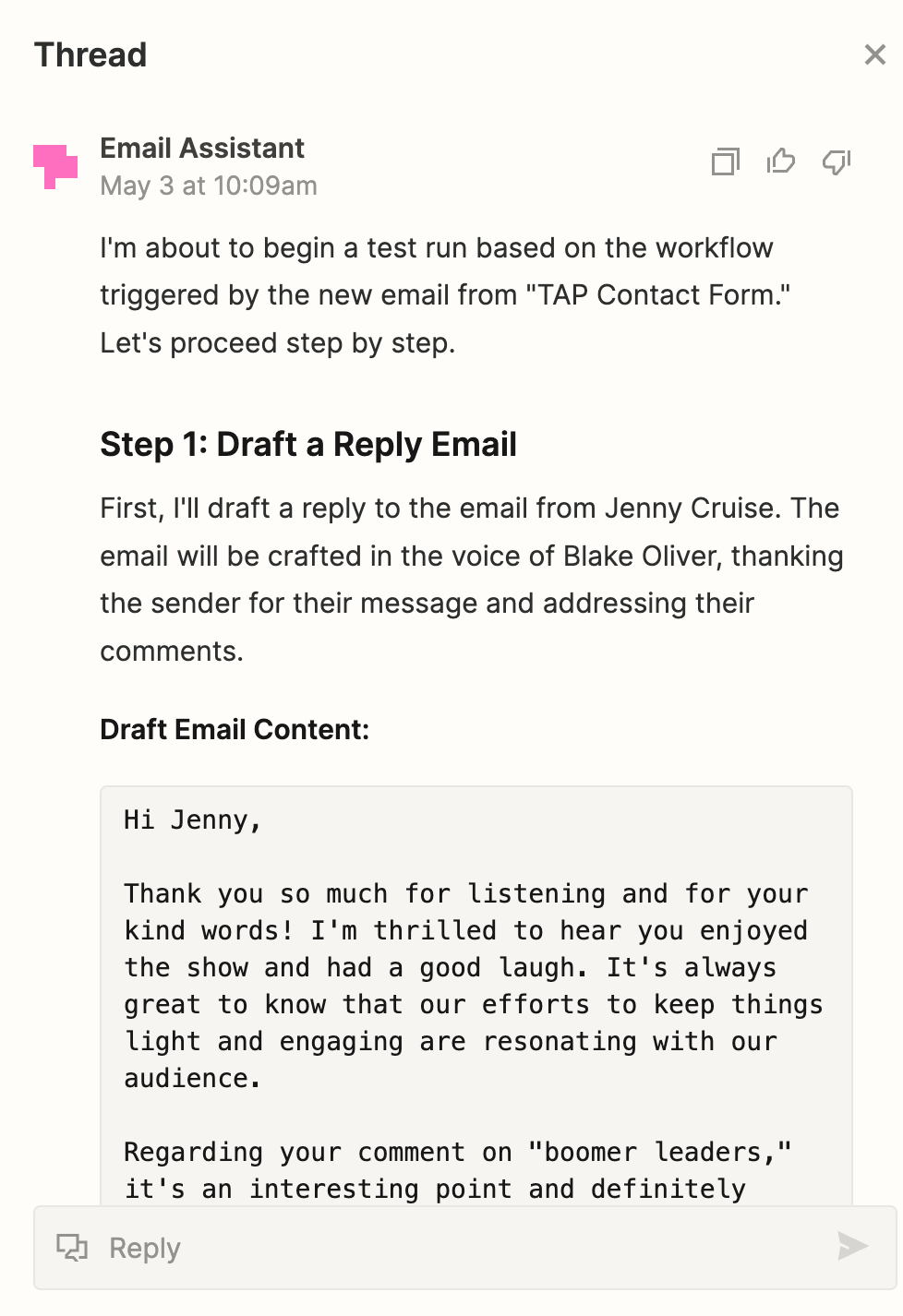
Here’s the agent thinking through what to do with a test email:

It worked!

Using AI Agents in Public Accounting

That got me thinking about how you could use AI agents in an accounting firm.

Let’s say that you’re tired of responding to requests from clients for information on how their tax return is going. You could create an agent with a behavior that says, “Every time I get an email asking about the status of a tax return, draft a reply letting the client know the status.”

But how would the AI agent know the status of the tax return? By connecting it to a spreadsheet – or perhaps your practice management software, if it’s sophisticated enough to work with Zapier.

Zapier lets you connect multiple data sources, such as Airtable, Google Sheets, Google Docs, Notion, etc.

Imagine if you had a Google Sheet where you tracked every tax return and the status of that return – not started, in progress, expected delivery date, any issues, etc.

You could then connect that data source to this AI agent and instruct it: “When a client asks about the status of their return, check the tax return spreadsheet and draft a reply with the status, who is working on it, and when we expect to complete it. Also, if the spreadsheet says we’re missing information, reply with a list of what we still need.”

You may need to add more detail about what columns to look in for each piece of information, but you get the idea. You’re programming the AI agent in plain English.

Using AI Agents in Corporate Finance

Here’s an example of how you could use an AI agent in corporate accounting. The Accounts Payable team. How often do they get the same email inquiries from vendors or customers?

Let’s say a vendor is asking about the status of the payment. Your email agent could watch for those emails and then automatically draft replies, letting them know when they will get paid or if something is holding up payment. You just have to connect your AP system to Zapier or sync the data to a spreadsheet that Zapier can watch.

You could create another behavior where if a customer requests a W-9, the AI agent sends an email with the signed W-9 attached. That’s one you could consider fully automating because it is low risk. You could choose to allow the agent to send the email without review.

Potential Uses Go Way Beyond Email

An important thing to note is that you don’t have to use this for email. This is just how I’ve been playing with it. You can trigger these agents with actions in thousands of apps. And these AI agents can then do stuff in thousands of apps.

There’s also a scheduling feature. This means triggers can be time-based, not just based on what happens in another app. You could schedule a behavior to run every day, every hour, every month, or every week.

Maybe that behavior is asking for a status update from your team on a particular project. For example, “If I haven’t received an update in so long, email the project owner and ask for an update.”

Now that I think about it, my own CEO job might be the first thing I automate.

AI Agents Are Happening Now

I don’t want you to think these AI agents are perfect; they are far from it. It’s brand new, so there will be things that don’t work right.

This behavior I showed you here is the one of three that worked well. The other two had some issues. So, don’t lose hope if you create an AI agent that doesn’t work exactly right. It’s going to take some time for these agents to work perfectly.

The important thing to take away from this is that AI agents aren’t just some far-off, futuristic concept – they’re a reality already starting to transform how we work right here and now.

I’ll keep sharing what I learn about AI agents, so subscribe to The Accounting Podcast and follow our LinkedIn page to see what I come up with.

Copyright © 2026 Earmark Inc. ・Log in

  • Help Center
  • Get The App
  • Terms & Conditions
  • Privacy Policy
  • Press Room
  • Contact Us
  • Refund Policy
  • Complaint Resolution Policy
  • About Us